
运维服务
docker离线安装
一、准备工作:确认架构并下载安装包 1.1 确认目标服务器架构 在目标服务器上执行以下命令,确认系统架构: 输出 x8664:对应 amd64 架构(Intel/AMD 64位服务
https://github.com/ctripcorp/apollo

https://github.com/nobodyiam/apollo-build-scripts
1、首先下载文件,这里下载的是代码然后自己编译,所以需要在我们的环境中安装JDK1.8版本、MYSQL5.6+以上版本、mavent。我已经安装完成,下面看一下我的集群结构
| 计算机名 | 环境 | IP | 程序 |
|---|---|---|---|
| wulaoer1 | DEV | 10.211.55.31 | apollo-adminservice、apollo-configservice、apollo-portal |
| wulaoer2 | UAT | 10.211.55.32 | admin、config |
| wulaoer3 | PRO | 10.211.55.33 | admin、config |
| MYSQL | MYSQL | 10.211.55.36 | MYSQL |
[root@wulaoer1 ~]# git clone https://github.com/ctripcorp/apollo.git
Cloning into 'apollo'...
remote: Enumerating objects: 3, done.
remote: Counting objects: 100% (3/3), done.
remote: Compressing objects: 100% (3/3), done.
remote: Total 93499 (delta 0), reused 0 (delta 0), pack-reused 93496
Receiving objects: 100% (93499/93499), 43.78 MiB | 5.62 MiB/s, done.
Resolving deltas: 100% (70886/70886), done.

[root@wulaoer2 ~]# git clone https://github.com/ctripcorp/apollo.git
Cloning into 'apollo'...
remote: Enumerating objects: 3, done.
remote: Counting objects: 100% (3/3), done.
remote: Compressing objects: 100% (3/3), done.
remote: Total 93499 (delta 0), reused 0 (delta 0), pack-reused 93496
Receiving objects: 100% (93499/93499), 43.78 MiB | 4.91 MiB/s, done.
Resolving deltas: 100% (70886/70886), done.

[root@wulaoer3 ~]# git clone https://github.com/ctripcorp/apollo.git
Cloning into 'apollo'...
remote: Enumerating objects: 3, done.
remote: Counting objects: 100% (3/3), done.
remote: Compressing objects: 100% (3/3), done.
remote: Total 93499 (delta 0), reused 0 (delta 0), pack-reused 93496
Receiving objects: 100% (93499/93499), 43.78 MiB | 4.65 MiB/s, done.
Resolving deltas: 100% (70886/70886), done.

[root@mysql ~]#  git clone https://github.com/nobodyiam/apollo-build-scripts.git
Cloning into 'apollo-build-scripts'...
remote: Enumerating objects: 6, done.
remote: Counting objects: 100% (6/6), done.
remote: Compressing objects: 100% (6/6), done.
remote: Total 244 (delta 1), reused 3 (delta 0), pack-reused 238
Receiving objects: 100% (244/244), 161.79 MiB | 3.91 MiB/s, done.
Resolving deltas: 100% (121/121), done.
必要的文件已经下载完了,下面开始配置一下,因为是在服务器上进行编译,所以分别配置,免得出现没有必要的麻烦。需要开通的端口分别是8070,8080,8090 3、修改build.sh脚本
[root@wulaoer1 ~]# vim apollo/scripts/build.sh
#!/bin/sh

# apollo config db info
apollo_config_db_url=jdbc:mysql://10.211.55.36:3306/ApolloConfigDB?characterEncoding=utf8
apollo_config_db_username=FillInCorrectUser
apollo_config_db_password=FillInCorrectPassword

# apollo portal db info
apollo_portal_db_url=jdbc:mysql://10.211.55.36:3306/ApolloPortalDB?characterEncoding=utf8
apollo_portal_db_username=FillInCorrectUser
apollo_portal_db_password=FillInCorrectPassword

# meta server url, different environments should have different meta server addresses
dev_meta=http://10.211.55.31:8080
fat_meta=http://fill-in-fat-meta-server:8080
uat_meta=http://10.211.55.32:8080
pro_meta=http://10.211.55.33:8080

META_SERVERS_OPTS="-Ddev_meta=$dev_meta -Dfat_meta=$fat_meta -Duat_meta=$uat_meta -Dpro_meta=$pro_meta"
wulaoer2的配置
[root@wulaoer2 ~]# vim apollo/scripts/build.sh
#!/bin/sh

# apollo config db info
apollo_config_db_url=jdbc:mysql://10.211.55.36:3306/UATApolloConfigDB?characterEncoding=utf8
apollo_config_db_username=FillInCorrectUser
apollo_config_db_password=FillInCorrectPassword

# apollo portal db info
apollo_portal_db_url=jdbc:mysql://10.211.55.36:3306/UATApolloPortalDB?characterEncoding=utf8
apollo_portal_db_username=FillInCorrectUser
apollo_portal_db_password=FillInCorrectPassword

# meta server url, different environments should have different meta server addresses
dev_meta=http://fill-in-dev-meta-server:8080
fat_meta=http://fill-in-fat-meta-server:8080
uat_meta=http://10.211.55.32:8080
pro_meta=http://fill-in-pro-meta-server:8080
wulaoer3的配置
[root@wulaoer3 ~]# vim apollo/scripts/build.sh
#!/bin/sh

# apollo config db info
apollo_config_db_url=jdbc:mysql://10.211.55.36:3306/PROApolloConfigDB?characterEncoding=utf8
apollo_config_db_username=FillInCorrectUser
apollo_config_db_password=FillInCorrectPassword

# apollo portal db info
apollo_portal_db_url=jdbc:mysql://10.211.55.36:3306/PROApolloPortalDB?characterEncoding=utf8
apollo_portal_db_username=FillInCorrectUser
apollo_portal_db_password=FillInCorrectPassword

# meta server url, different environments should have different meta server addresses
dev_meta=http://fill-in-dev-meta-server:8080
fat_meta=http://fill-in-fat-meta-server:8080
uat_meta=http://fill-in-uat-meta-server:8080
pro_meta=http://10.211.55.33:8080
目前配置了三个环境分别是:DEV、UAT、PRO,三个数据库分别是:ApolloConfigDB、UATApolloConfigDB、PROApolloPortalDB,不同环境使用不同的数据库。 4、安装数据库
[root@mysql ~]# cd apollo-build-scripts/sql/
[root@mysql sql]# ls
apolloconfigdb.sql  apolloportaldb.sql
[root@mysql sql]# pwd
/root/apollo-build-scripts/sql
apolloconfigdb.sql是配置的库,apolloportaldb.sql是portal的库,所以只需要导入一次portal即可。下面创建三个环境的数据库: DEV环境使用的是默认的,所以直接导入即可:
[root@mysql sql]# /usr/local/mysql/bin/mysql -uroot -p
Enter password:
Welcome to the MySQL monitor.  Commands end with ; or \g.
Your MySQL connection id is 2860
Server version: 5.6.44-log Source distribution

Copyright (c) 2000, 2019, Oracle and/or its affiliates. All rights reserved.

Oracle is a registered trademark of Oracle Corporation and/or its
affiliates. Other names may be trademarks of their respective
owners.

Type 'help;' or '\h' for help. Type '\c' to clear the current input statement.

mysql> source /root/apollo-build-scripts/sql/apolloconfigdb.sql;
........
mysql> source /root/apollo-build-scripts/sql/apolloportaldb.sql;
下面创建UAT环境的库,需要修改一下库的名称,这里我只修改文件中的库名,其他的不做修改:
[root@mysql sql]# vim apolloconfigdb.sql
# Create Database
# ------------------------------------------------------------
CREATE DATABASE IF NOT EXISTS UATApolloConfigDB DEFAULT CHARACTER SET = utf8mb4;

Use UATApolloConfigDB;
................
[root@mysql sql]# /usr/local/mysql/bin/mysql -uroot -p
Enter password:
Welcome to the MySQL monitor.  Commands end with ; or \g.
Your MySQL connection id is 2902
Server version: 5.6.44-log Source distribution

Copyright (c) 2000, 2019, Oracle and/or its affiliates. All rights reserved.

Oracle is a registered trademark of Oracle Corporation and/or its
affiliates. Other names may be trademarks of their respective
owners.

Type 'help;' or '\h' for help. Type '\c' to clear the current input statement.

mysql> source /root/apollo-build-scripts/sql/apolloconfigdb.sql;
配置PRO环境的数据库
[root@mysql sql]# vim apolloconfigdb.sql
# Create Database
# ------------------------------------------------------------
CREATE DATABASE IF NOT EXISTS PROApolloConfigDB DEFAULT CHARACTER SET = utf8mb4;

Use PROApolloConfigDB;
....................
[root@mysql sql]# /usr/local/mysql/bin/mysql -uroot -p
Enter password:
Welcome to the MySQL monitor.  Commands end with ; or \g.
Your MySQL connection id is 2906
Server version: 5.6.44-log Source distribution

Copyright (c) 2000, 2019, Oracle and/or its affiliates. All rights reserved.

Oracle is a registered trademark of Oracle Corporation and/or its
affiliates. Other names may be trademarks of their respective
owners.

Type 'help;' or '\h' for help. Type '\c' to clear the current input statement.

mysql> source /root/apollo-build-scripts/sql/apolloconfigdb.sql;
验证一下:
mysql> show databases;
+--------------------+
| Database           |
+--------------------+
| information_schema |
| ApolloConfigDB     |
| ApolloPortalDB     |
| PROApolloConfigDB  |
| UATApolloConfigDB  |
| mysql              |
| performance_schema |
+--------------------+
7 rows in set (0.01 sec)
三个环境的库已经创建完成,下面配置配置网络策略,在构建之前,需要把apollo-configservice和apollo-adminservice的IP和端口注册导Meta Server(apollo-configservice本身),Apollo客户端和Protal会从Meta Server获取服务的IP地址和端口,然后通过服务地址直接访问。
[root@wulaoer1 ~]# vim apollo/apollo-adminservice/src/main/resources/bootstrap.yml
eureka:
  instance:
    homePageUrl: http://10.211.55.31:8090      #新增
    hostname: ${hostname:localhost}
    preferIpAddress: true
    status-page-url-path: /info
    health-check-url-path: /health

[root@wulaoer1 ~]# vim apollo/apollo-configservice/src/main/resources/bootstrap.yml
eureka:
  instance:
    homePageUrl: http://10.211.55.31:8080      #新增
    hostname: ${hostname:localhost}
    preferIpAddress: true
    status-page-url-path: /info
    health-check-url-path: /health

[root@wulaoer2 ~]# vim apollo/apollo-adminservice/src/main/resources/bootstrap.yml
eureka:
  instance:
    homePageUrl: http://10.211.55.32:8090
    hostname: ${hostname:localhost}
    preferIpAddress: true
    status-page-url-path: /info
    health-check-url-path: /health

[root@wulaoer2 ~]# vim apollo/apollo-configservice/src/main/resources/bootstrap.yml
eureka:
  instance:
    homePageUrl: http://10.211.55.32:8080
    hostname: ${hostname:localhost}
    preferIpAddress: true
    status-page-url-path: /info
    health-check-url-path: /health

[root@wulaoer3 ~]# vim apollo/apollo-adminservice/src/main/resources/bootstrap.yml
eureka:
  instance:
    homePageUrl: http://10.211.55.33:8090
    hostname: ${hostname:localhost}
    preferIpAddress: true
    status-page-url-path: /info
    health-check-url-path: /health

[root@wulaoer3 ~]# vim apollo/apollo-configservice/src/main/resources/bootstrap.yml
eureka:
  instance:
    homePageUrl: http://10.211.55.33:8080
    hostname: ${hostname:localhost}
    preferIpAddress: true
    status-page-url-path: /info
    health-check-url-path: /health
修改Eureka服务的URL的值,在ApolloConfigDB中ServerConfig表Eureka服务Url的值
use  ApolloConfigDB;
show tables;
select * from  ServerConfig;
update ServerConfig set Value='http://10.211.55.31:8080/eureka/' where Id=1;


use  UATApolloConfigDB;
show tables;
select * from  ServerConfig;
update ServerConfig set Value='http://10.211.55.32:8080/eureka/' where Id=1;

use  PROApolloConfigDB;
show tables;
select * from  ServerConfig;
update ServerConfig set Value='http://10.211.55.33:8080/eureka/' where Id=1;
修改一下设置的环境:
use ApolloPortalDB;
select * from ServerConfig;
update ServerConfig set Value='fat,uat,pro' where Id=1;
构建
[root@wulaoer1 ~]# ./apollo/scripts/build.sh
...............
[INFO] Reactor Summary:
[INFO]
[INFO] Apollo 1.5.0-SNAPSHOT .............................. SUCCESS [  2.782 s]
[INFO] Apollo Core ........................................ SUCCESS [ 28.983 s]
[INFO] Apollo Common ...................................... SUCCESS [ 11.325 s]
[INFO] Apollo Open Api .................................... SUCCESS [  3.151 s]
[INFO] Apollo Portal 1.5.0-SNAPSHOT ....................... SUCCESS [ 13.620 s]
[INFO] ------------------------------------------------------------------------
[INFO] BUILD SUCCESS
[INFO] ------------------------------------------------------------------------
[INFO] Total time: 01:03 min
[INFO] Finished at: 2019-09-01T12:53:46+08:00
[INFO] ------------------------------------------------------------------------
==== building portal finished ====
[root@wulaoer2 ~]# ./apollo/scripts/build.sh
................
[INFO] Reactor Summary:
[INFO]
[INFO] Apollo 1.5.0-SNAPSHOT .............................. SUCCESS [  2.287 s]
[INFO] Apollo Core ........................................ SUCCESS [ 19.710 s]
[INFO] Apollo Common ...................................... SUCCESS [ 18.292 s]
[INFO] Apollo Open Api .................................... SUCCESS [  8.591 s]
[INFO] Apollo Portal 1.5.0-SNAPSHOT ....................... SUCCESS [ 24.502 s]
[INFO] ------------------------------------------------------------------------
[INFO] BUILD SUCCESS
[INFO] ------------------------------------------------------------------------
[INFO] Total time: 01:16 min
[INFO] Finished at: 2019-09-12T00:13:50+08:00
[INFO] ------------------------------------------------------------------------
==== building portal finished ====
[root@wulaoer3 ~]# ./apollo/scripts/build.sh
................
[INFO] Apollo 1.5.0-SNAPSHOT .............................. SUCCESS [  3.099 s]
[INFO] Apollo Core ........................................ SUCCESS [ 14.187 s]
[INFO] Apollo Common ...................................... SUCCESS [  7.207 s]
[INFO] Apollo Open Api .................................... SUCCESS [  6.426 s]
[INFO] Apollo Portal 1.5.0-SNAPSHOT ....................... SUCCESS [ 36.180 s]
[INFO] ------------------------------------------------------------------------
[INFO] BUILD SUCCESS
[INFO] ------------------------------------------------------------------------
[INFO] Total time: 01:09 min
[INFO] Finished at: 2019-09-01T14:39:22+08:00
[INFO] ------------------------------------------------------------------------
==== building portal finished ====
将构建的压缩包copy出来,放到程序的目录下,压缩然后启动:
[root@wulaoer1 ~]# mkdir -p /opt/{data,logs}
[root@wulaoer1 ~]# cp apollo/apollo-adminservice/target/apollo-adminservice-1.5.0-SNAPSHOT-github.zip /opt/data/
[root@wulaoer1 ~]# cp apollo/apollo-configservice/target/apollo-configservice-1.5.0-SNAPSHOT-github.zip /opt/data/
[root@wulaoer1 ~]# cp apollo/apollo-portal/target/apollo-portal-1.5.0-SNAPSHOT-github.zip /opt/data/

[root@wulaoer2 ~]# mkdir -p /usr/local/apollo/{data,logs}
[root@wulaoer2 ~]# cp apollo/apollo-adminservice/target/apollo-adminservice-1.5.0-SNAPSHOT-github.zip /opt/data/
[root@wulaoer2 ~]# cp apollo/apollo-configservice/target/apollo-configservice-1.5.0-SNAPSHOT-github.zip /opt/data/

[root@wulaoer3 ~]# mkdir -p /usr/local/apollo/{data,logs}
[root@wulaoer3 ~]# cp apollo/apollo-adminservice/target/apollo-adminservice-1.5.0-SNAPSHOT-github.zip /opt/data/
[root@wulaoer3 ~]# cp apollo/apollo-configservice/target/apollo-configservice-1.5.0-SNAPSHOT-github.zip /opt/data/
设置日志权限,如果是线上可以增加一个磁盘然后做软链接把日志文件链接到磁盘上,方便管理。这里说明一下logs路径是程序默认的路径,不得修改。
[root@wulaoer1 ~]# mkdir -p /opt/logs/{100003171,100003172,100003173}
[root@wulaoer1 ~]# chmod 777 /opt/logs/*

[root@wulaoer2 ~]#  mkdir -p /opt/logs/{100003171,100003172}
[root@wulaoer2 ~]# chmod 777 /opt/logs/*

[root@wulaoer3 ~]#  mkdir -p /opt/logs/{100003171,100003172}
[root@wulaoer3 ~]# chmod 777 /opt/logs/*
解压并启动程序
[root@wulaoer1 ~]# cd /opt/data/
[root@wulaoer1 data]# ls
apollo-adminservice-1.5.0-SNAPSHOT-github.zip  apollo-configservice-1.5.0-SNAPSHOT-github.zip  apollo-portal-1.5.0-SNAPSHOT-github.zip
[root@Server1 data]# unzip apollo-adminservice-1.5.0-SNAPSHOT-github.zip -d apollo-adminservice
Archive:  apollo-adminservice-1.5.0-SNAPSHOT-github.zip
   creating: apollo-adminservice/scripts/
  inflating: apollo-adminservice/scripts/startup.sh
   creating: apollo-adminservice/config/
  inflating: apollo-adminservice/config/app.properties
  inflating: apollo-adminservice/apollo-adminservice.conf
  inflating: apollo-adminservice/apollo-adminservice-1.5.0-SNAPSHOT.jar
  inflating: apollo-adminservice/scripts/shutdown.sh
  inflating: apollo-adminservice/config/application-github.properties
  inflating: apollo-adminservice/apollo-adminservice-1.5.0-SNAPSHOT-sources.jar
[root@wulaoer1 data]# unzip apollo-configservice-1.5.0-SNAPSHOT-github.zip -d apollo-configservice
Archive:  apollo-configservice-1.5.0-SNAPSHOT-github.zip
  inflating: apollo-configservice/scripts/shutdown.sh
  inflating: apollo-configservice/scripts/startup.sh
  inflating: apollo-configservice/apollo-configservice.conf
  inflating: apollo-configservice/apollo-configservice-1.5.0-SNAPSHOT.jar
   creating: apollo-configservice/config/
  inflating: apollo-configservice/config/app.properties
  inflating: apollo-configservice/config/application-github.properties
  inflating: apollo-configservice/apollo-configservice-1.5.0-SNAPSHOT-sources.jar
[root@wulaoer1 data]# unzip apollo-portal-1.5.0-SNAPSHOT-github.zip -d apollo-portal
Archive:  apollo-portal-1.5.0-SNAPSHOT-github.zip
   creating: apollo-portal/scripts/
  inflating: apollo-portal/scripts/startup.sh
  inflating: apollo-portal/apollo-portal.conf
  inflating: apollo-portal/apollo-portal-1.5.0-SNAPSHOT-sources.jar
  inflating: apollo-portal/scripts/shutdown.sh
   creating: apollo-portal/config/
  inflating: apollo-portal/config/app.properties
  inflating: apollo-portal/config/apollo-env.properties
  inflating: apollo-portal/config/application-github.properties
  inflating: apollo-portal/apollo-portal-1.5.0-SNAPSHOT.jar


[root@wulaoer1 data]# ./apollo-adminservice/scripts/startup.sh
Sun Sep  1 13:37:42 CST 2019 ==== Starting ====
Started [1870]
Waiting for server startup........
Sun Sep  1 13:38:23 CST 2019 Server started in 40 seconds!

[root@wulaoer1 data]# ./apollo-configservice/scripts/startup.sh
Sun Sep  1 13:40:23 CST 2019 ==== Starting ====
Started [2201]
Waiting for server startup.......
Sun Sep  1 13:40:59 CST 2019 Server started in 35 seconds!

[root@wulaoer1 data]# ./apollo-portal/scripts/startup.sh
Sun Sep  1 13:43:58 CST 2019 ==== Starting ====
Started [2440]
Waiting for server startup.....
Sun Sep  1 13:44:24 CST 2019 Server started in 25 seconds!
解压启动wulaoer2
[root@wulaoer2 data]# unzip apollo-adminservice-1.5.0-SNAPSHOT-github.zip -d apollo-adminservice
Archive:  apollo-adminservice-1.5.0-SNAPSHOT-github.zip
   creating: apollo-adminservice/scripts/
  inflating: apollo-adminservice/scripts/startup.sh
   creating: apollo-adminservice/config/
  inflating: apollo-adminservice/config/app.properties
  inflating: apollo-adminservice/config/application-github.properties
  inflating: apollo-adminservice/apollo-adminservice-1.5.0-SNAPSHOT.jar
  inflating: apollo-adminservice/scripts/shutdown.sh
  inflating: apollo-adminservice/apollo-adminservice.conf
  inflating: apollo-adminservice/apollo-adminservice-1.5.0-SNAPSHOT-sources.jar
[root@wulaoer2 data]# unzip apollo-configservice-1.5.0-SNAPSHOT-github.zip -d apollo-configservice
Archive:  apollo-configservice-1.5.0-SNAPSHOT-github.zip
   creating: apollo-configservice/scripts/
  inflating: apollo-configservice/scripts/startup.sh
   creating: apollo-configservice/config/
  inflating: apollo-configservice/config/app.properties
  inflating: apollo-configservice/apollo-configservice.conf
  inflating: apollo-configservice/config/application-github.properties
  inflating: apollo-configservice/apollo-configservice-1.5.0-SNAPSHOT-sources.jar
  inflating: apollo-configservice/apollo-configservice-1.5.0-SNAPSHOT.jar
  inflating: apollo-configservice/scripts/shutdown.sh

[root@wulaoer2 data]# ./apollo-adminservice/scripts/startup.sh
Thu Sep 12 01:10:31 CST 2019 ==== Starting ====
Started [8257]
Waiting for server startup........
Thu Sep 12 01:11:12 CST 2019 Server started in 40 seconds!

[root@wulaoer2 data]# ./apollo-configservice/scripts/startup.sh
Thu Sep 12 01:11:31 CST 2019 ==== Starting ====
Started [8491]
Waiting for server startup........
Thu Sep 12 01:12:13 CST 2019 Server started in 40 seconds!
解压启动wulaoer3
[root@wulaoer3 data]# unzip apollo-adminservice-1.5.0-SNAPSHOT-github.zip -d apollo-adminservice
Archive:  apollo-adminservice-1.5.0-SNAPSHOT-github.zip
   creating: apollo-adminservice/scripts/
  inflating: apollo-adminservice/scripts/startup.sh
   creating: apollo-adminservice/config/
  inflating: apollo-adminservice/config/app.properties
  inflating: apollo-adminservice/apollo-adminservice.conf
  inflating: apollo-adminservice/apollo-adminservice-1.5.0-SNAPSHOT-sources.jar
  inflating: apollo-adminservice/scripts/shutdown.sh
  inflating: apollo-adminservice/config/application-github.properties
  inflating: apollo-adminservice/apollo-adminservice-1.5.0-SNAPSHOT.jar

[root@wulaoer3 data]# unzip apollo-configservice-1.5.0-SNAPSHOT-github.zip -d apollo-configservice
Archive:  apollo-configservice-1.5.0-SNAPSHOT-github.zip
   creating: apollo-configservice/scripts/
  inflating: apollo-configservice/scripts/startup.sh
   creating: apollo-configservice/config/
  inflating: apollo-configservice/config/app.properties
  inflating: apollo-configservice/apollo-configservice-1.5.0-SNAPSHOT.jar
  inflating: apollo-configservice/scripts/shutdown.sh
  inflating: apollo-configservice/apollo-configservice.conf
  inflating: apollo-configservice/config/application-github.properties
  inflating: apollo-configservice/apollo-configservice-1.5.0-SNAPSHOT-sources.jar

[root@wulaoer3 data]# ./apollo-adminservice/scripts/startup.sh
Sun Sep  1 15:37:25 CST 2019 ==== Starting ====
Started [1012]
Waiting for server startup........
Sun Sep  1 15:38:06 CST 2019 Server started in 40 seconds!
[root@wulaoer3 data]# ./apollo-configservice/scripts/startup.sh
Sun Sep  1 15:41:53 CST 2019 ==== Starting ====
Started [1268]
Waiting for server startup........
Sun Sep  1 15:42:34 CST 2019 Server started in 40 seconds!
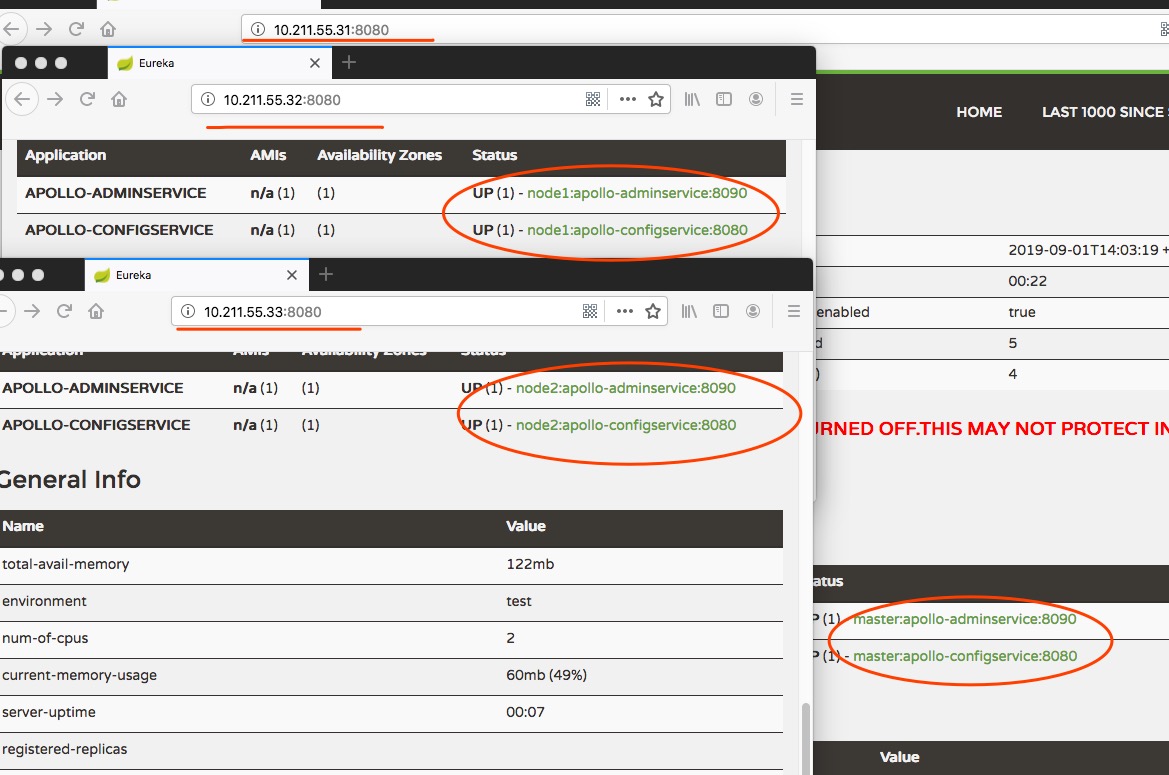
至此,apollo集群已经部署完成,下面验证一下: 1、先看一下eureka:
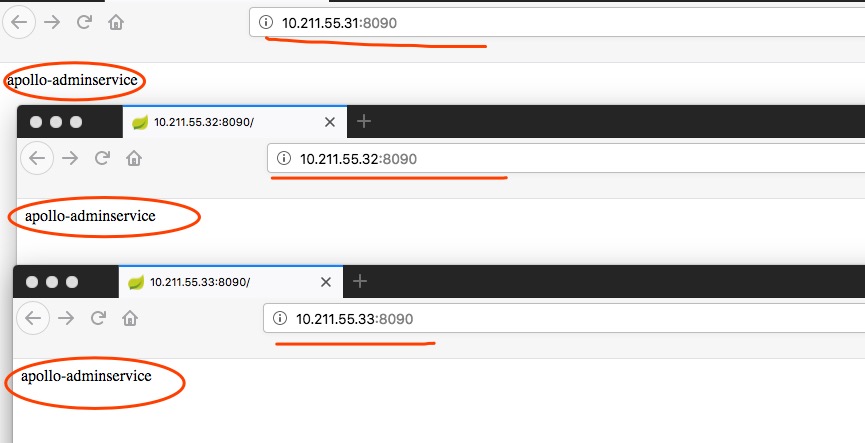
 验证一下admin
 验证一下apollo
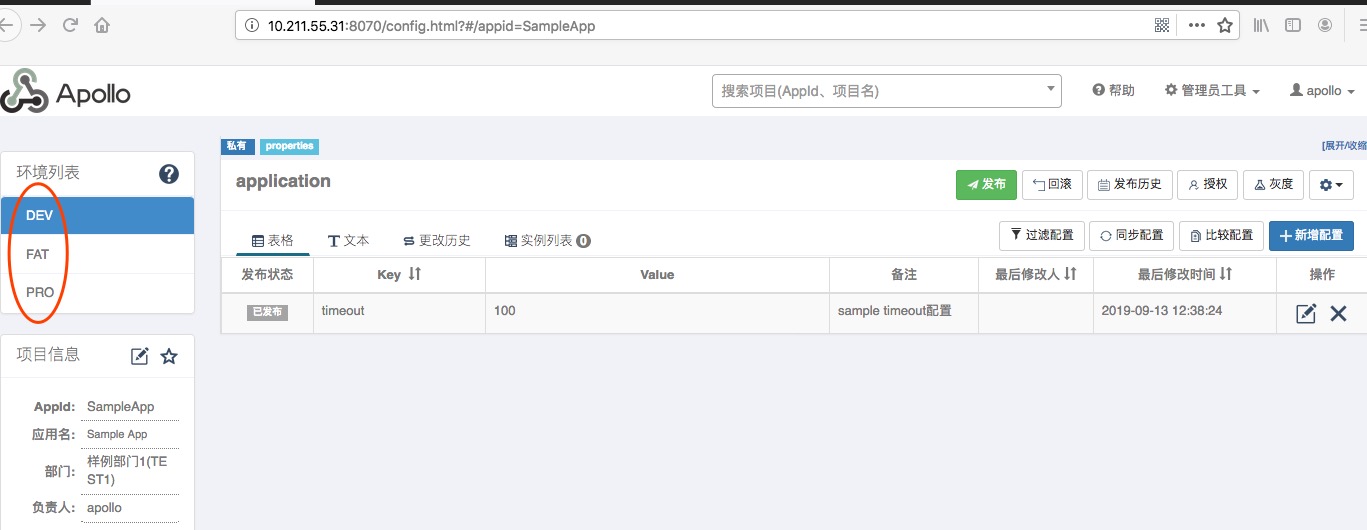 三个环境已经搭建完成。
一、准备工作:确认架构并下载安装包 1.1 确认目标服务器架构 在目标服务器上执行以下命令,确认系统架构: 输出 x8664:对应 amd64 架构(Intel/AMD 64位服务

1\. 环境准备 操作系统:推荐使用 Ubuntu 22.04 / Debian 12 权限:需要 root 或 sudo 权限 网络:确保服务器有公网 IP,并且 UDP 119

我的环境是这样的,在window里共享里一个目录然后需要在pod里可以读取这个目录,想过使用直接把共享目录接入到kubernetes集群里,发现,无法直接读取共享的目录,没有办法,
评论 0