
运维服务
docker离线安装
一、准备工作:确认架构并下载安装包 1.1 确认目标服务器架构 在目标服务器上执行以下命令,确认系统架构: 输出 x8664:对应 amd64 架构(Intel/AMD 64位服务
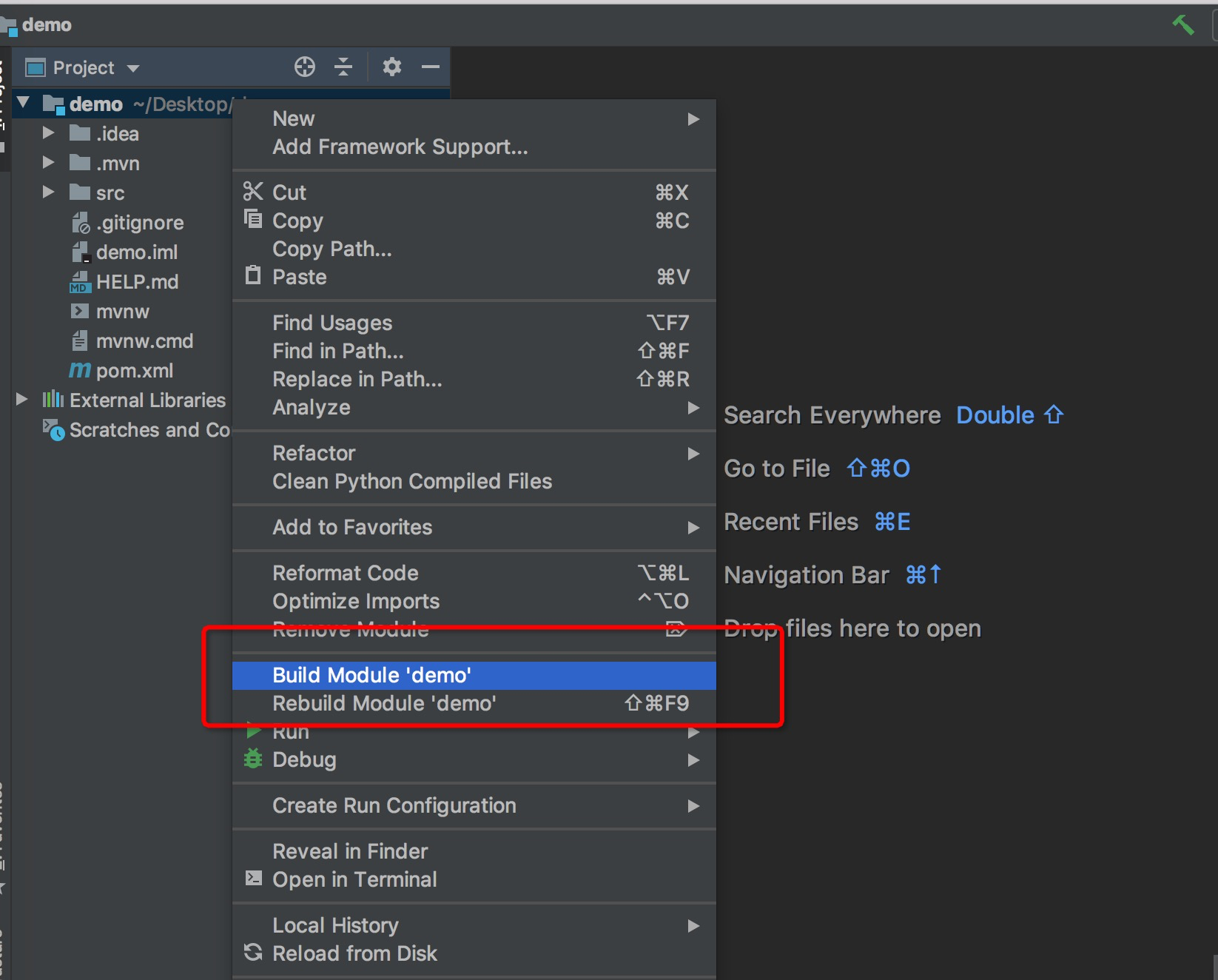 加载了springboot的插件,下面写一个hello接口
package com.example.demo;

import org.springframework.boot.SpringApplication;
import org.springframework.boot.autoconfigure.SpringBootApplication;
import org.springframework.web.bind.annotation.GetMapping;
import org.springframework.web.bind.annotation.RequestParam;
import org.springframework.web.bind.annotation.RestController;


@SpringBootApplication
@RestController
public class DemoApplication {

    public static void main(String[] args) {
        SpringApplication.run(DemoApplication.class, args);
    }

    @GetMapping("/hello")
    public String hello() {
        return "hello www.wulaoer.org";
    }
}
写好后,直接运行一下,使用浏览器访问一下localhost:8080/hello是否有return返回的数据,我这里就不测试了,我这里直接打包,在IDEA的右侧有一个Maven,点击一下如下图:
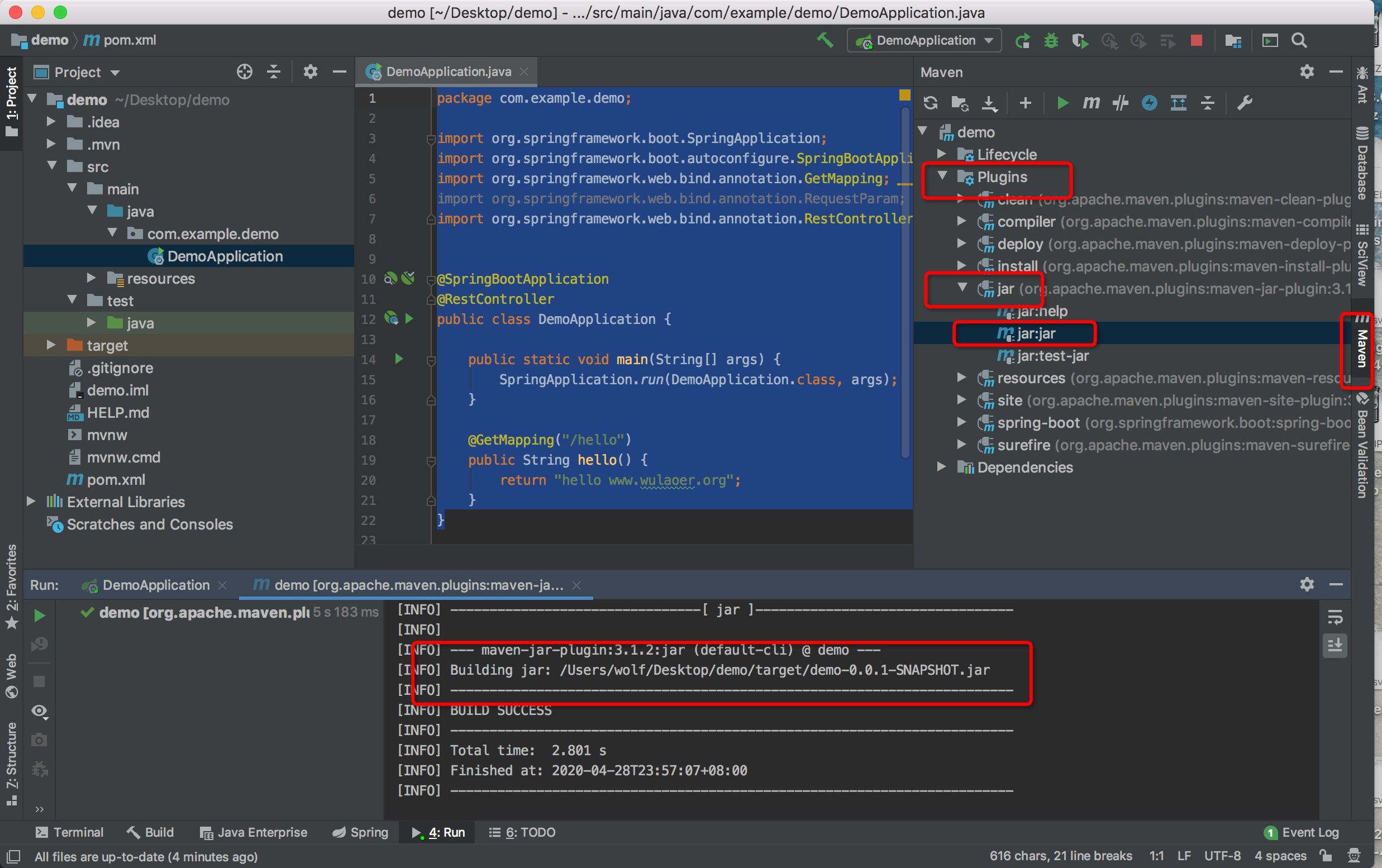 先是Maven---pligins---jar---jar.jar直接打包后在demon项目下有一个target目录生成一个demo-0.0.1-SNAPSHOT.jar包,就是项目的jar包。使用这个打包的时候运行jar包会出现
[root@www.wulaoer.org wulaoer]# java -jar demo-0.0.1-SNAPSHOT.jar
no main manifest attribute, in demo-0.0.1-SNAPSHOT.jar
这是个错误的打包方式,看下面的
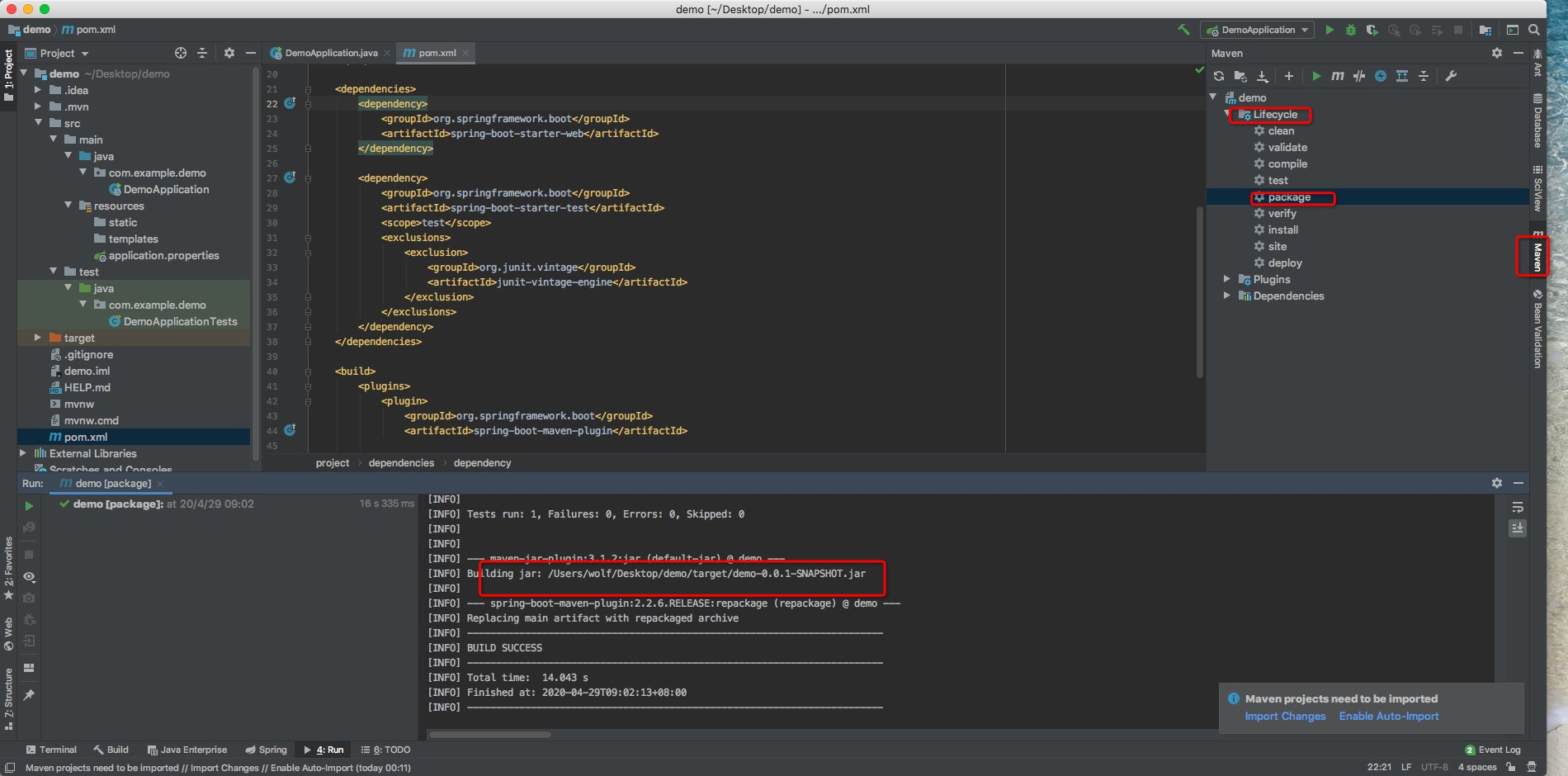
[root@www.wulaoer.org wulaoer]# ls
demo-0.0.1-SNAPSHOT.jar
[root@www.wulaoer.org wulaoer]# java -jar demo-0.0.1-SNAPSHOT.jar

  .   ____          _            __ _ _
 /\\ / ___'_ __ _ _(_)_ __  __ _ \ \ \ \
( ( )\___ | '_ | '_| | '_ \/ _` | \ \ \ \
 \\/  ___)| |_)| | | | | || (_| |  ) ) ) )
  '  |____| .__|_| |_|_| |_\__, | / / / /
 =========|_|==============|___/=/_/_/_/
 :: Spring Boot ::        (v2.2.6.RELEASE)

2020-04-28 22:29:17.013  INFO 7996 --- [           main] com.example.demo.DemoApplication         : Starting DemoApplication v0.0.1-SNAPSHOT on CentOS1 with PID 7996 (/usr/local/wulaoer/demo-0.0.1-SNAPSHOT.jar started by root in /usr/local/wulaoer)
2020-04-28 22:29:17.022  INFO 7996 --- [           main] com.example.demo.DemoApplication         : No active profile set, falling back to default profiles: default
2020-04-28 22:29:20.083  INFO 7996 --- [           main] o.s.b.w.embedded.tomcat.TomcatWebServer  : Tomcat initialized with port(s): 8080 (http)
2020-04-28 22:29:20.127  INFO 7996 --- [           main] o.apache.catalina.core.StandardService   : Starting service [Tomcat]
2020-04-28 22:29:20.128  INFO 7996 --- [           main] org.apache.catalina.core.StandardEngine  : Starting Servlet engine: [Apache Tomcat/9.0.33]
2020-04-28 22:29:20.324  INFO 7996 --- [           main] o.a.c.c.C.[Tomcat].[localhost].[/]       : Initializing Spring embedded WebApplicationContext
2020-04-28 22:29:20.325  INFO 7996 --- [           main] o.s.web.context.ContextLoader            : Root WebApplicationContext: initialization completed in 3045 ms
2020-04-28 22:29:20.744  INFO 7996 --- [           main] o.s.s.concurrent.ThreadPoolTaskExecutor  : Initializing ExecutorService 'applicationTaskExecutor'
2020-04-28 22:29:21.160  INFO 7996 --- [           main] o.s.b.w.embedded.tomcat.TomcatWebServer  : Tomcat started on port(s): 8080 (http) with context path ''
2020-04-28 22:29:21.168  INFO 7996 --- [           main] com.example.demo.DemoApplication         : Started DemoApplication in 5.976 seconds (JVM running for 8.227)
demo已经启动了,下面验证一下访问是否正常。
[root@www.wulaoer.org ~]# curl http://localhost:8080/hello
hello www.wulaoer.org
[root@www.wulaoer.org ~]#
使用idea打jar包已经完成,也使用view---tool windows----maven就可以把idea右边的maven调出来。
一、准备工作:确认架构并下载安装包 1.1 确认目标服务器架构 在目标服务器上执行以下命令,确认系统架构: 输出 x8664:对应 amd64 架构(Intel/AMD 64位服务

1\. 环境准备 操作系统:推荐使用 Ubuntu 22.04 / Debian 12 权限:需要 root 或 sudo 权限 网络:确保服务器有公网 IP,并且 UDP 119

我的环境是这样的,在window里共享里一个目录然后需要在pod里可以读取这个目录,想过使用直接把共享目录接入到kubernetes集群里,发现,无法直接读取共享的目录,没有办法,
评论 0