
DevOps
Jenkins 构建 Node 项目内存溢出(JavaScript heap out of memory)解决方案
1\. 问题描述 在 Jenkins CI/CD 构建前端项目(Vue / Vite / Webpack 等)时,执行: 报错: 即 Node.js 在运行时超出了默认 V8 引擎
# tree deploy.k8s
deploy.k8s
├── defaults
│   └── main.yml
├── files
├── handlers
│   └── main.yml
├── meta
│   └── main.yml
├── README.md
├── tasks
│   └── main.yml
├── templates
│   └── deploy.j2
├── tests
│   ├── inventory
│   └── test.yml
└── vars
    └── main.yml

8 directories, 9 files
在tenolates下的deploy.j2是pod的模版,通过jenkins把值赋给变量,然后生成一个完整的模版,看一下deploy.j2的内容:
# cat deploy.k8s/templates/deploy.j2
apiVersion: apps/v1
kind: Deployment
metadata:
  name: {{ SVC_NAME }}
  namespace: {{ SVC_NS }}
  labels:
    app: {{ SVC_NAME }}
    release: {{ SVC_ENV }}
spec:
  replicas: {{ SVC_REPLICAS }}
  selector:
    matchLabels:
      app: {{ SVC_NAME }}
      release: {{ SVC_ENV }}
  template:
    metadata:
      labels:
        app: {{ SVC_NAME }}
        release: {{ SVC_ENV }}
    spec:
      containers:
      - image: ********/{{ SVC_NAME }}-{{ SVC_ENV }}:{{ BUILD_NUMBER }}
        imagePullPolicy: Always
        name: {{ SVC_NAME }}
        readinessProbe:
          httpGet:
            port: {{ SVC_PORT }}
            path: /health
          initialDelaySeconds: 30
          periodSeconds: 10
          timeoutSeconds: 30
          failureThreshold: 10
        resources:
          requests:
            cpu: {{ SVC_CPU }}
            memory: {{ SVC_MEM }}Gi
          limits:
            cpu: {{ SVC_CPU }}
            memory: {{ SVC_MEM }}Gi
        env:
          - name: aliyun_logs_log-{{ SVC_NAME }}
            value: stdout
      nodeSelector:
        node: {{ SVC_NODE }}
      imagePullSecrets:
      - name: reach-{{ SVC_ENV }}-image      #镜像认证

---
apiVersion: v1
kind: Service
metadata:
  labels:
    app: {{ SVC_NAME }}
    release: {{ SVC_ENV }}
  name: {{ SVC_NAME }}
  namespace: {{ SVC_NS }}
spec:
  ports:
  - name: {{ SVC_NAME }}
    port: {{ SVC_PORT }}
    protocol: TCP
    targetPort: {{ SVC_PORT }}
  selector:
    app: {{ SVC_NAME }}
    release: {{ SVC_ENV }}
  type: ClusterIP
下面就需要看看jenkins如何把值赋给变量了。
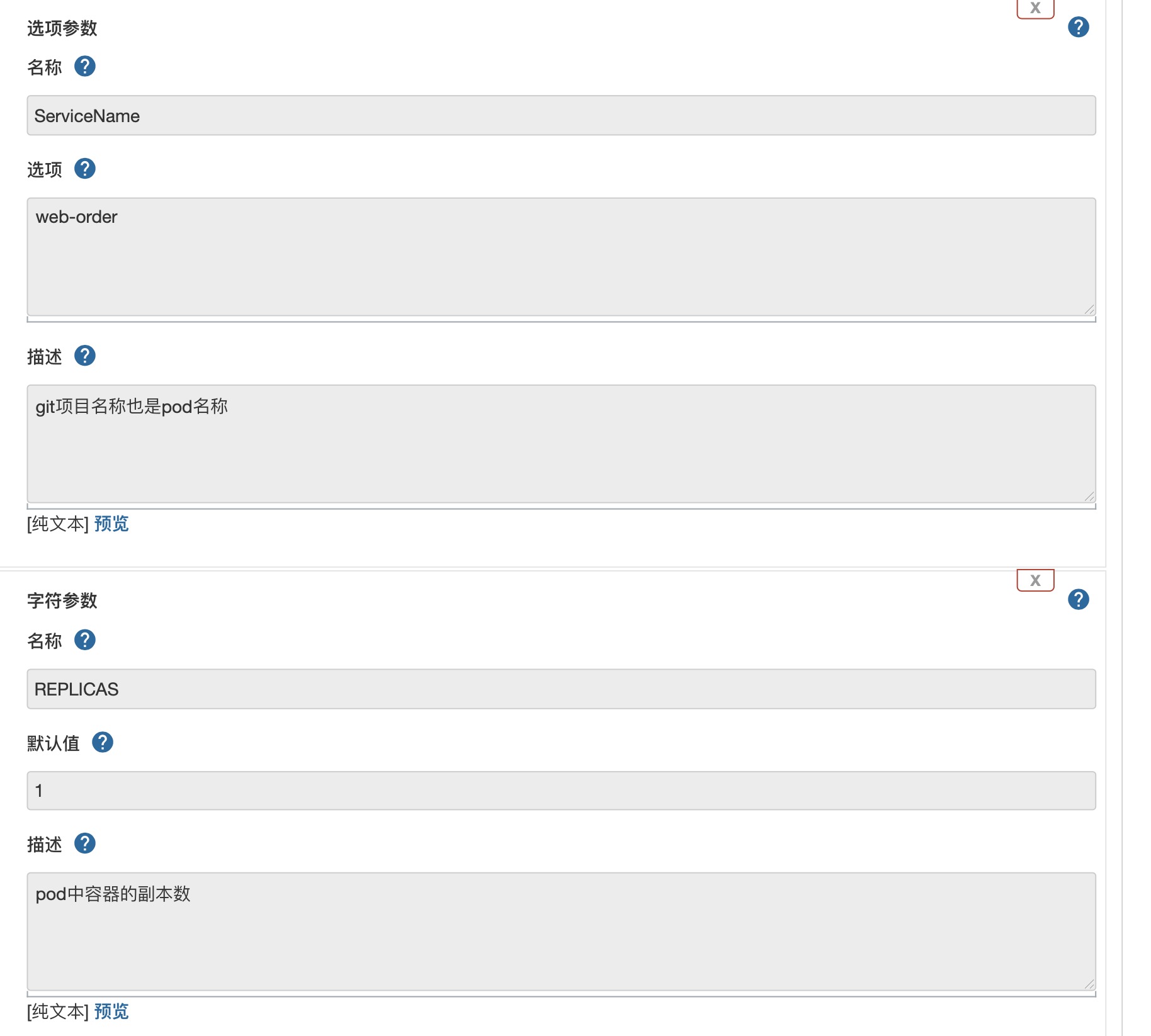
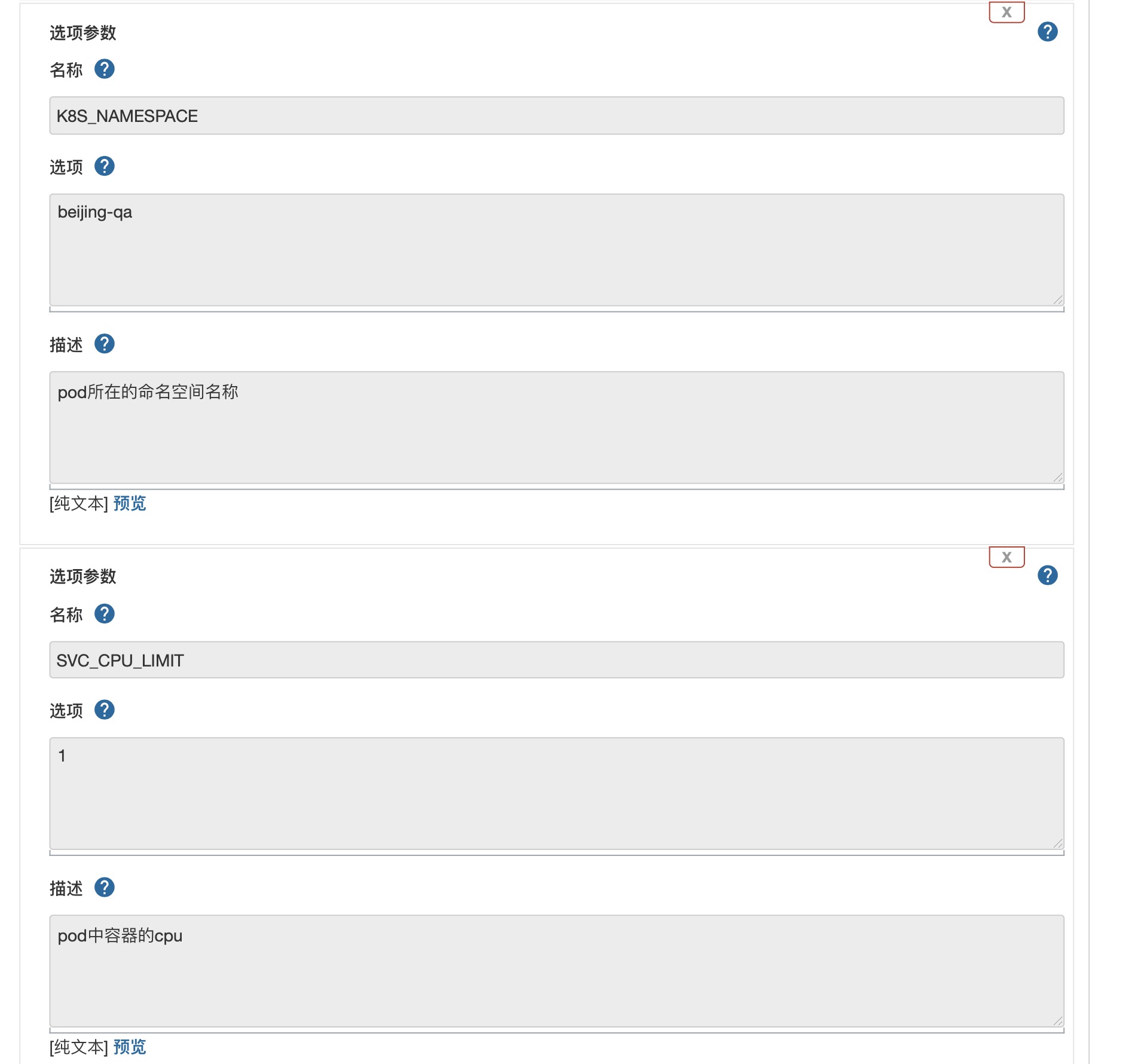
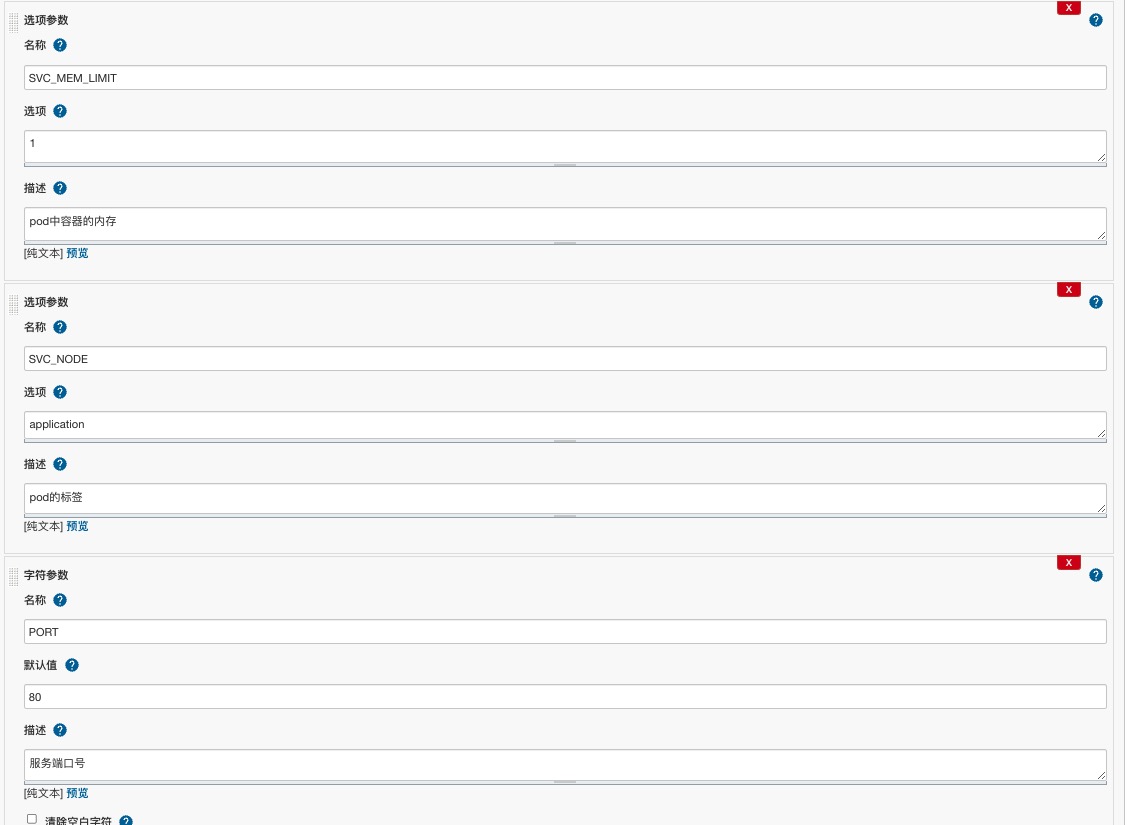 以上是针对deploy.j2的变量输出,其他的都是Jenkins环境变量和项目的,不过这里注意,在jenkins一定要勾选
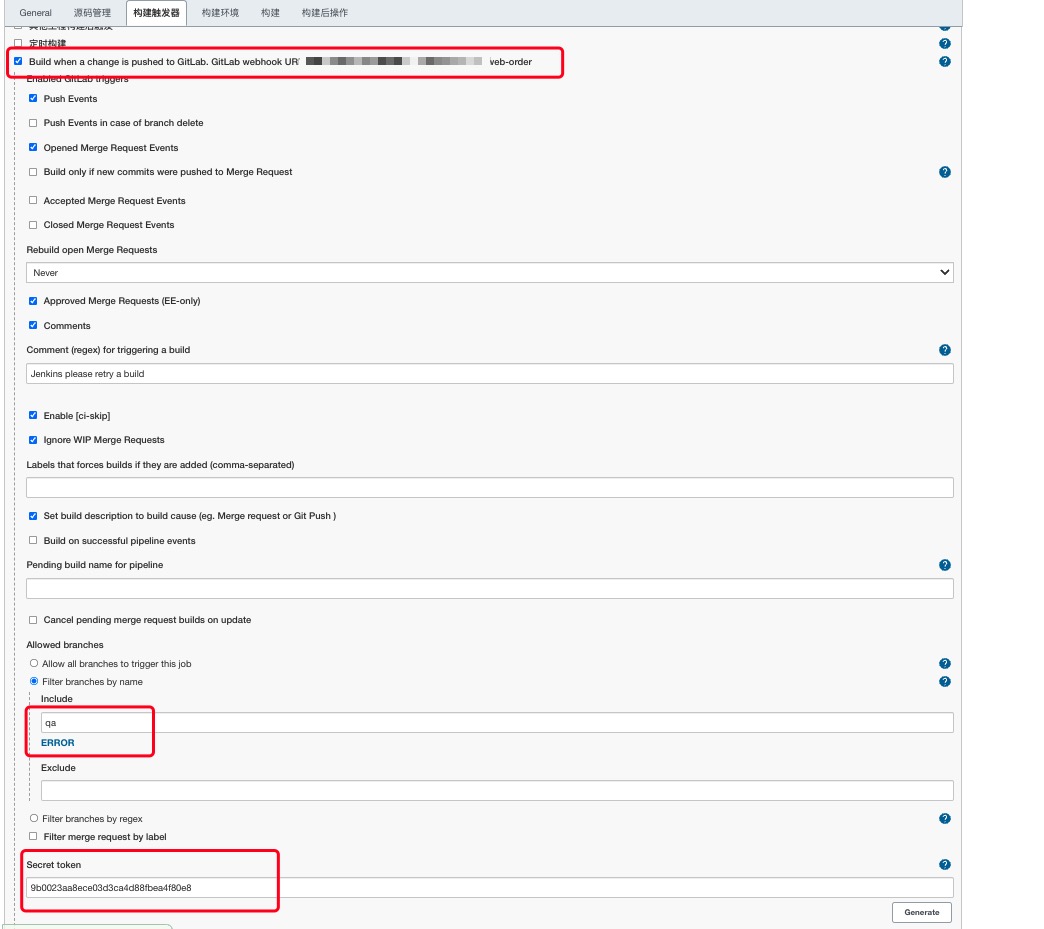 这里就是配置git中的webhook触发的地方,上面的地址,分支,token,注意如果使用的是tag,可以配置tag正则的方式也是可以的,后面就是打包生成镜像的问题了,dockerfile可以写到代码里也可以写到jenkins里,不过我比较倾向于写到代码里,这样方便。镜像也制作完成了,下面就是生成pod的yaml文件
 /etc/ansible/books/deploy_k8s_${ENV}.yaml -e "host=${ENV}_reach_k8s
SVC_NAME=${ServiceName} \
SVC_NS=${K8S_NAMESPACE} \
SVC_ENV=${ENV} \
SVC_PORT=${PORT} \
SVC_REPLICAS=${REPLICAS} \
SVC_CPU=${SVC_CPU_LIMIT} \
SVC_MEM=${MEM_LIMIT} \
BUILD_NUMBER=${BUILD_NUMBER} \
SVC_NODE=${SVC_NODE} "
把上面的值传到文件中生成一个yaml文件,并执行,这个执行是在
# cat deploy.k8s/tasks/main.yml
---
# tasks file for deploy.k8s
- template:
    src: deploy.j2
    dest: /tmp/deploy.yaml
    owner: root
    group: root
    mode: 0644
    force: true

- name: "deploy service to kubernetes"
  shell: "kubectl apply -f /tmp/deploy.yaml"

#- file:
#    path: /tmp/deploy.yaml
#    state: absent
不过这里执行时deploy.yaml文件会覆盖掉,所以同一个环境不能同时生成,不过可以在这里加个时间变量就解决了。
下面看git的webhook的配置,
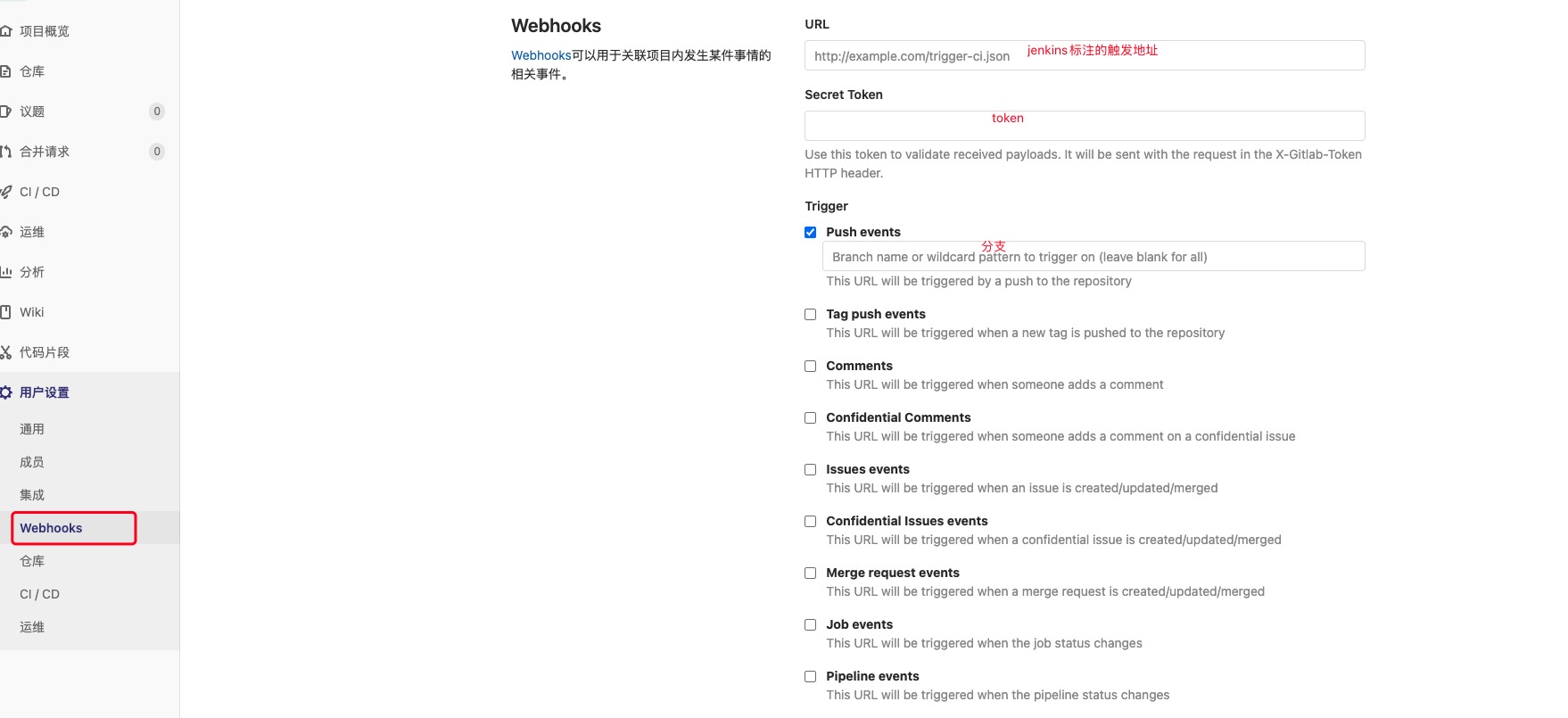 这样每次合并代码就会自动触发,不需要任何操作,唯一的遗憾就是job比较多,每个项目都需要加配置。
1\. 问题描述 在 Jenkins CI/CD 构建前端项目(Vue / Vite / Webpack 等)时,执行: 报错: 即 Node.js 在运行时超出了默认 V8 引擎

jenkins中的job在打包时,总是提示Too many open files,通常是因为系统中允许打开的文件句柄数量超过了限制。要解决这个问题,您可以按照以下步骤增加系统和 J
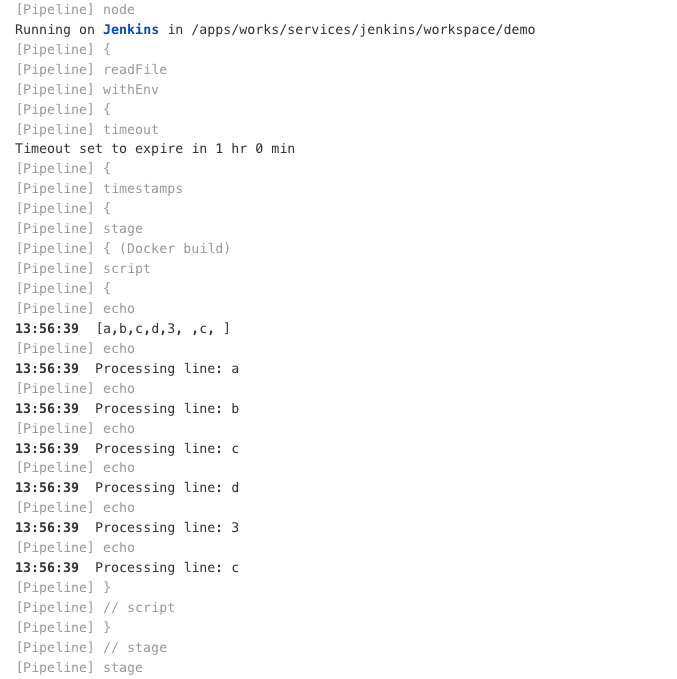
前面已经说过,在每次发布服务时,需要选择一下分支,还要选择服务名称,只所以这样选择是因为避免构建的时候发布了没必要的服务,但是我们又需要明白服务名称,这里就尝试是否可以在pipel
评论 0