云原生
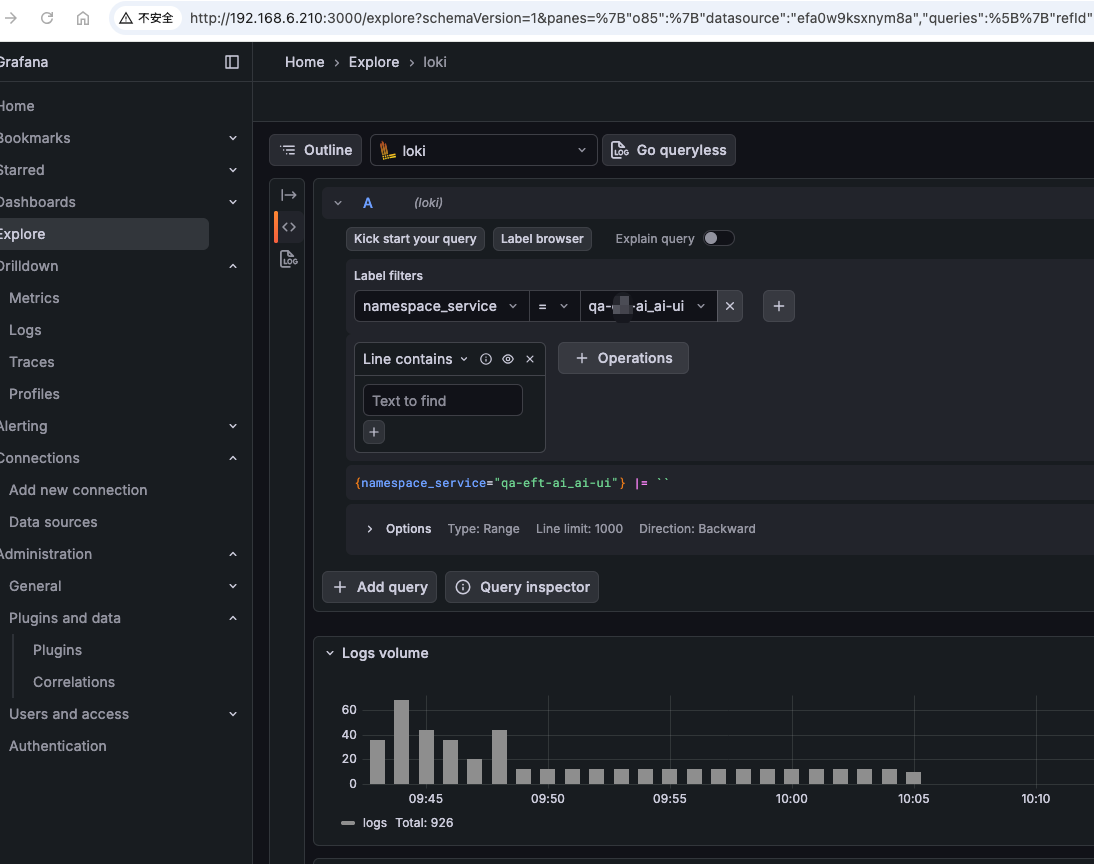
利用kurise做日志采集使用promtail做sidecar采集日志
利用OpenKurise中的kruise做日志采集,原来我使用的是filebeat作为sidecar采集日志的,虽然采集没有什么问题,但是通过es进才看日志就比较繁琐了,这次实验p
[wolf@wulaoer.org ~]$ sudo apt-get update && sudo apt-get install -y apt-transport-https
[wolf@wulaoer.org ~]$ curl -s https://packages.cloud.google.com/apt/doc/apt-key.gpg | sudo apt-key add -
[wolf@wulaoer.org ~]$ echo "deb https://apt.kubernetes.io/ kubernetes-xenial main" | sudo tee -a /etc/apt/sources.list.d/kubernetes.list
[wolf@wulaoer.org ~]$ sudo apt-get update
[wolf@wulaoer.org ~]$ sudo apt-get install -y kubectl
[wolf@wulaoer.org ~]$ cat <<EOF > /etc/yum.repos.d/kubernetes.repo
[kubernetes]
name=Kubernetes
baseurl=https://packages.cloud.google.com/yum/repos/kubernetes-el7-x86_64
enabled=1
gpgcheck=1
repo_gpgcheck=1
gpgkey=https://packages.cloud.google.com/yum/doc/yum-key.gpg https://packages.cloud.google.com/yum/doc/rpm-package-key.gpg
EOF
[wolf@wulaoer.org ~]$ yum install -y kubectl
[wolf@wulaoer.org ~]$ brew install kubernetes-cli
[wolf@wulaoer.org ~]$ kubectl version --client
以上是各种环境安装kubectl的方法,可以根据自己的环境选择适合自己的方式安装,如果已经安装好了kubectl,就可以设置kubectl自动补全了。
[wolf@wulaoer.org ~]$ /usr/bin/ruby -e "$(curl -fsSL https://raw.githubusercontent.com/Homebrew/install/master/install)"安装之后,看一下kubectl的帮助:
[wolf@wulaoer.org ~]$ kubectl completion --help
Output shell completion code for the specified shell (bash or zsh). The shell code must be evaluated to provide
interactive completion of kubectl commands.  This can be done by sourcing it from the .bash_profile.

 Detailed instructions on how to do this are available here:
https://kubernetes.io/docs/tasks/tools/install-kubectl/#enabling-shell-autocompletion

 Note for zsh users: [1] zsh completions are only supported in versions of zsh >= 5.2

Examples:
  # Installing bash completion on macOS using homebrew
  ## If running Bash 3.2 included with macOS
  brew install bash-completion
  ## or, if running Bash 4.1+
  brew install bash-completion@2
  ## If kubectl is installed via homebrew, this should start working immediately.
  ## If you've installed via other means, you may need add the completion to your completion directory
  kubectl completion bash > $(brew --prefix)/etc/bash_completion.d/kubectl


  # Installing bash completion on Linux
  ## If bash-completion is not installed on Linux, please install the 'bash-completion' package
  ## via your distribution's package manager.
  ## Load the kubectl completion code for bash into the current shell
  source <(kubectl completion bash)
  ## Write bash completion code to a file and source if from .bash_profile
  kubectl completion bash > ~/.kube/completion.bash.inc
  printf "
  # Kubectl shell completion
  source '$HOME/.kube/completion.bash.inc'
  " >> $HOME/.bash_profile
  source $HOME/.bash_profile

  # Load the kubectl completion code for zsh[1] into the current shell
  source <(kubectl completion zsh)
  # Set the kubectl completion code for zsh[1] to autoload on startup
  kubectl completion zsh > "${fpath[1]}/_kubectl"

Usage:
  kubectl completion SHELL [options]

Use "kubectl options" for a list of global command-line options (applies to all commands).
根据上面的提示可以看到3.2版本的使用brew install bash-completion,如果大于4.1版本可以使用brew install bash-completion@2看一下我的bash的版本:
[wolf@wulaoer.org ~]$ /bin/bash --version
GNU bash, version 3.2.57(1)-release (x86_64-apple-darwin19)
Copyright (C) 2007 Free Software Foundation, Inc.
我的是3.2版本的,所以选择第一种方式安装,
[wolf@wulaoer.org ~]$ brew install bash-completion因为涉及到国外的网站下载,所以需要做一下本地解析:
[wolf@wulaoer.org ~]$ cat /etc/hosts
................................
199.232.28.133    raw.githubusercontent.com
把kubectl completion bash 增加到你的completion 目录:
[wolf@wulaoer.org ~]$ kubectl completion bash > $(brew --prefix)/etc/bash_completion.d/kubectl调用brew info命令,根据提示将指令添加到~/.bash_profile中:
[wolf@wulaoer.org ~]$ brew info bash-completion
bash-completion: stable 1.3 (bottled)
Programmable completion for Bash 3.2
https://salsa.debian.org/debian/bash-completion
Conflicts with:
  bash-completion@2 (because each are different versions of the same formula)
/usr/local/Cellar/bash-completion/1.3_3 (189 files, 607.9KB) *
  Poured from bottle on 2020-08-13 at 14:28:23
From: https://github.com/Homebrew/homebrew-core/blob/HEAD/Formula/bash-completion.rb
==> Caveats
Add the following line to your ~/.bash_profile:
  [[ -r "/usr/local/etc/profile.d/bash_completion.sh" ]] && . "/usr/local/etc/profile.d/bash_completion.sh"

Bash completion has been installed to:
  /usr/local/etc/bash_completion.d
==> Analytics
install: 9,475 (30 days), 29,898 (90 days), 151,703 (365 days)
install-on-request: 8,820 (30 days), 27,651 (90 days), 140,266 (365 days)
build-error: 0 (30 days)
根据上面的提示,把[[ -r "/usr/local/etc/profile.d/bash_completion.sh" ]] && . "/usr/local/etc/profile.d/bash_completion.sh"添加到~/.bash_profile中,然后设置zsh
[wolf@wulaoer.org ~]$ source <(kubectl completion zsh)
[wolf@wulaoer.org ~]$ echo "source <(kubectl completion zsh)" >> ~/.zshrc
[wolf@wulaoer.org ~]$ source ~/.zshrc
重新打开终端即可。
[wolf@wulaoer.org ~]# yum install bash-completion -y

[wolf@wulaoer.org ~]# echo "source <(kubectl completion bash)" >> ~/.bashrc

[wolf@wulaoer.org ~]# source ~/.bashrc

[wolf@wulaoer.org ~]# source /usr/share/bash-completion/bash_completion
[wolf@wulaoer.org ~]# source <(kubectl completion bash)
Ubuntu环境kubectl自动补全
[wolf@wulaoer.org ~]$ apt install bash-completion
// locate bash_completion
[wolf@wulaoer.org ~]$ source /usr/share/bash-completion/bash_completion
[wolf@wulaoer.org ~]$ source <(kubectl completion bash)
以上是三个环境的kubectl的自动补全方法,kubectl能够自动补全会起到事半功倍的效果。这个算是学习kubernetes的一个知识点吧,也是学习前的入门。
利用OpenKurise中的kruise做日志采集,原来我使用的是filebeat作为sidecar采集日志的,虽然采集没有什么问题,但是通过es进才看日志就比较繁琐了,这次实验p

RBAC(RoleBased Access Control)是 Kubernetes 中最核心、最常用的权限控制模型。无论你是平台管理员、SRE,还是 K8s 应用开发者,只要你需

在 Kubernetes 环境下,通过 Filebeat 采集容器日志并将其转发至日志平台(如 Kafka、Elasticsearch)是一种常见的日志解决方案。为了实现日志的可观
评论 0